All the ways you can self-host an LLM: 7 options from a laptop to a GPU cluster
Compare options for self-hosting LLMs locally, on GPUs, in containers, at the edge, and across cloud or on-prem infrastructure.
There’s a reason self-hosting keeps coming up in conversations around LLMs lately. Running your own LLM can provide data control, offline inference, custom fine-tuning, and predictable infrastructure. It also shifts the hardware, security, scaling, and maintenance work onto you.
If you're here from feeling the swirl of “too many options” out there, in this guide, we’ll go through:
-
Seven common self-hosting approaches, from running a model on your laptop to managing GPU servers and clusters.
-
A simple decision framework to pick the right option for your needs.
The vocabulary you should know
LLM terminology escalates fast and can feel overwhelming if you're just getting started. These are the concepts used throughout the rest of this guide:
| Term | Definition |
|---|---|
| Acceleration | Techniques or hardware that speed up inference. This includes GPUs, special chips, optimized libraries, and tricks that make models respond quicker. |
| Inference | When an AI model predicts or responds. |
| Instance | A single running copy of the LLM. |
| KV cache | Memory used to retain attention data from tokens already processed, which avoids recomputing them during generation. |
| Latency | How long one request takes, including time to first token and the pace of later tokens. |
| Nodes | Computing machines used to run models. |
| Orchestration | The process of coordinating all the moving parts; models, nodes, scaling, routing requests; to ensure everything works as expected. |
| Parameters | Tiny, learned values inside an AI model that shape how it understands language, makes decisions, and generates responses. For example, when someone says "a 7B model," it means the model has 7 billion parameters, 7 billion tiny dials that collectively determine how it behaves. |
| Quantization | Shrinking the model's numbers to make it lighter and faster. |
| Throughput | The total requests or tokens a server can process over time, especially when multiple users are active. |
Why do LLMs need special hardware?
While LLMs can run on general-purpose CPUs, they usually run faster and more efficiently on specialized AI hardware because inference repeatedly performs matrix multiplication and other highly parallel operations.
Simply put, they are essentially giant stacks of mathematical operations that scale with billions or trillions of parameters. All modern LLMs (from OpenAI, Google, Anthropic, Mistral, and so on) carry out operations like matrix multiplications, attention operations, and vector dot products to perform tasks like projection, translation, and transformation.
You can run a small quantized model on a MacBook, a mini PC, or even a Raspberry Pi. The practical limit comes down to memory capacity, memory bandwidth, model size, and how quickly you need responses.
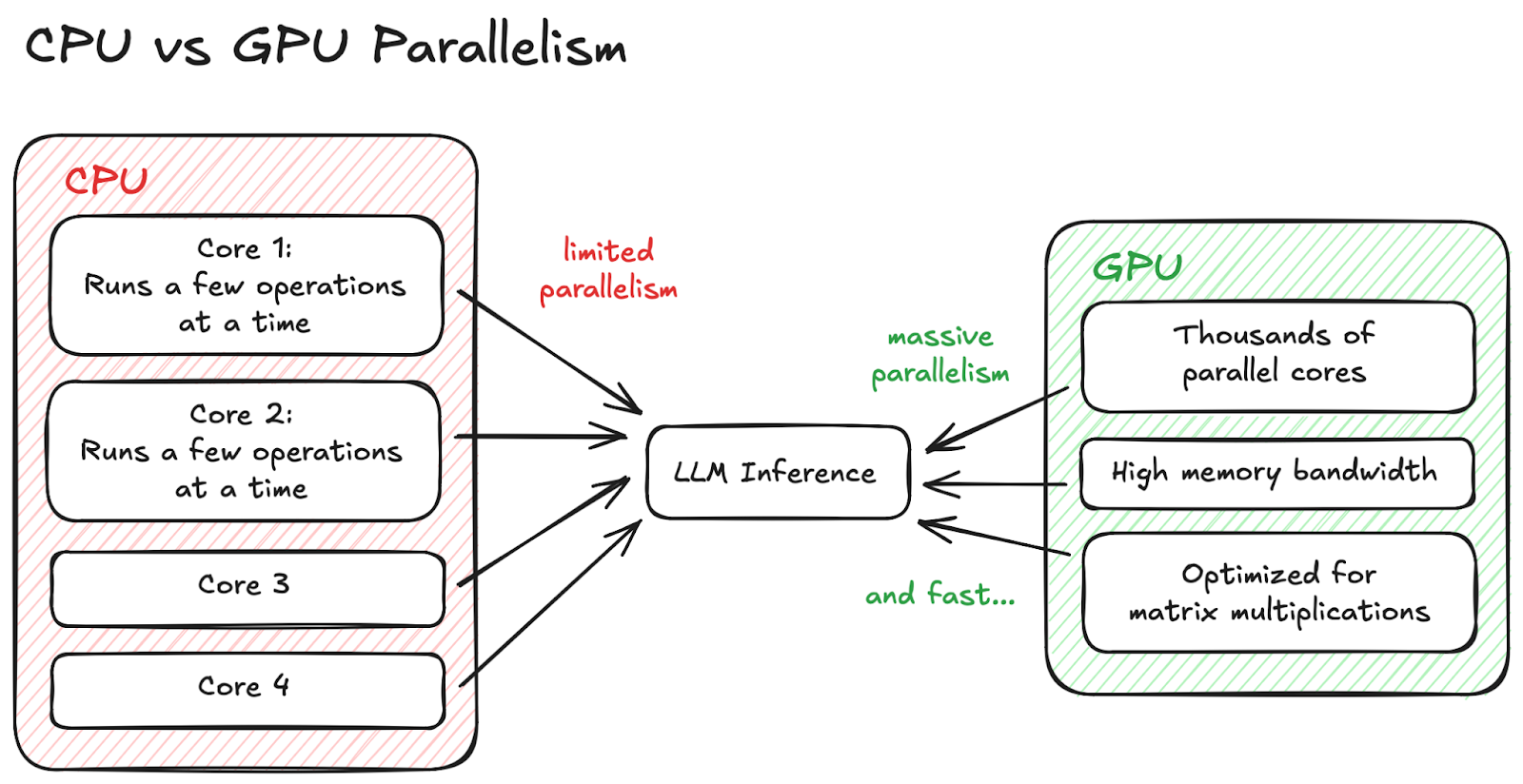 CPU vs GPU Parallelism
In the case of a Raspberry Pi, limited memory and bandwidth make small quantized models the realistic target. A modern GPU can execute far more operations in parallel, but its available VRAM still determines which models and context lengths will fit.
How model size, quantization, and context length affect memory
The first approximation is straightforward:
raw model memory ≈ parameter count × bits per parameter ÷ 8
A 7-billion-parameter model stored at 4-bit precision therefore needs roughly 3.5 GB for its weights alone. Real inference needs more memory for runtime buffers, temporary activations, and the KV cache, so the model file size is never the full requirement.
| Model size | Approximate 4-bit weight size | Practical RAM/VRAM starting capacity* |
|---|---|---|
| 7–8B parameters | 3.5–4 GB | 6–8 GB |
| 13–14B parameters | 6.5–7 GB | 10–12 GB |
| 30–32B parameters | 15–16 GB | 20–24 GB |
| 70B parameters | 35 GB | 42–48+ GB |
*These are rough starting points for one active request and a modest context window. Architecture, quantization format, runtime, and operating-system usage can move the numbers substantially.
Quantization reduces the memory occupied by model weights, often from 16-bit to 8-bit or 4-bit values, at the cost of some numerical precision. Context length is a separate expense: longer prompts create a larger KV cache, and every concurrent request needs its own cache. A model that fits comfortably for one short chat can still run out of memory under long-context or multi-user traffic.
Apple Silicon versus NVIDIA GPUs
Apple Silicon uses unified memory shared by the CPU and GPU. That lets tools such as MLX LM, llama.cpp, and Ollama use a large portion of the machine's memory without copying the model into a separate VRAM pool. It is a convenient setup for private, single-user inference and local development, although macOS and other applications compete for the same memory.
NVIDIA GPUs use dedicated VRAM and the CUDA software ecosystem. They are the more common choice for production serving with runtimes such as vLLM and SGLang, especially when batching requests, using multiple GPUs, or optimizing for many concurrent users. The tradeoff is a harder memory ceiling: a model and its runtime state must fit across the available GPU memory unless the runtime offloads part of the work elsewhere.
Single-user latency versus multi-user throughput
For a local assistant, you usually care about time to first token and how quickly one response streams. For a shared API, you care about throughput: how many requests and tokens the server can process while keeping latency acceptable.
Serving runtimes improve throughput by batching work from multiple requests. That keeps the GPU busy, but it also consumes more KV-cache memory and can make an individual request wait behind others. Test with the concurrency and context lengths you expect in production; a one-user tokens-per-second benchmark does not describe a multi-user service.
Should you self-host your LLM?
Before we dive into implementation options, let’s run a quick sanity check:
Key Considerations
-
Do you need strict data privacy?
-
Do you need predictable, controllable latency?
-
Do you need offline or air-gapped inference?
-
Do you need to fine-tune or customize the model deeply?
-
Do you want to avoid per-token cloud pricing at scale?
-
Are you okay owning the operational burden?
If reading those made you think, ‘yeah, I do need that,’ then self-hosting is likely a good fit.
Exploring self-hosting solutions
1. On a local machine
The easiest route for most people is Ollama. It handles model downloads, quantized builds, and a local API on macOS, Windows, and Linux. If you want more control over model files, CPU/GPU offloading, and server options, llama.cpp is a lightweight alternative that runs across a wide range of hardware.
On Apple Silicon, MLX LM is designed specifically for generating, quantizing, and fine-tuning models with Apple's MLX framework. Ollama and llama.cpp remain simpler general-purpose choices; MLX is worth considering when you want to work directly with an Apple-native runtime.
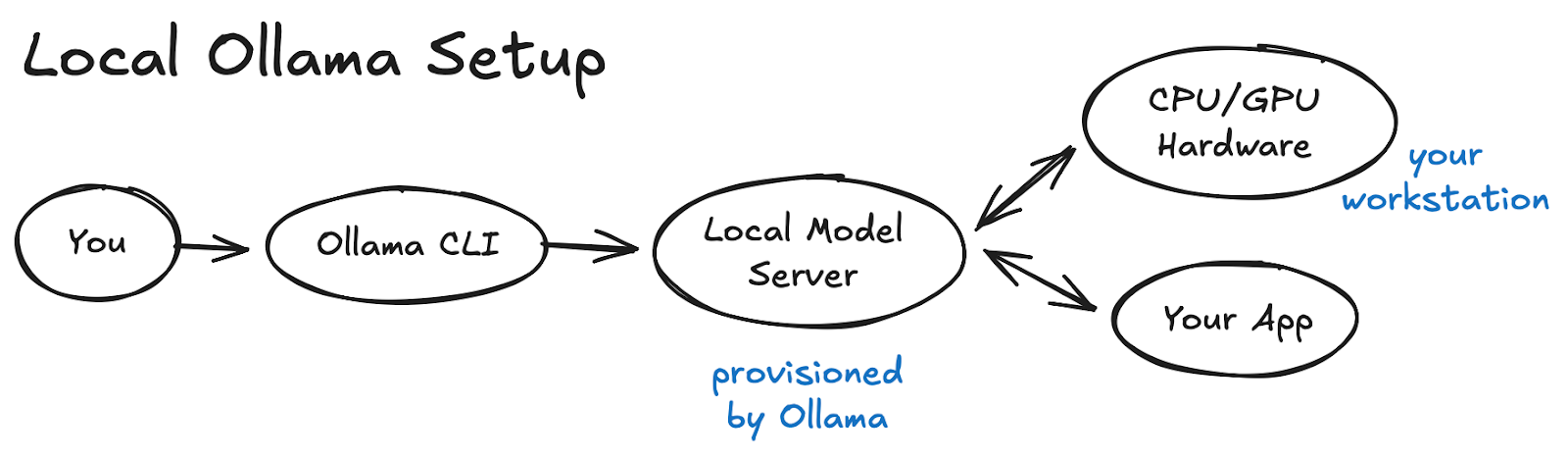 Local Ollama Setup
Start locally before exposing anything to the network. If another application needs to call the model, here’s a guide on how to expose and secure your self-hosted Ollama API.
2. On a local GPU workstation
If you have an NVIDIA GPU with enough VRAM, a dedicated workstation gives you more sustained performance and serving control than a general-purpose laptop. It is useful for development, internal services, and testing the same CUDA-based runtime you plan to deploy in the cloud.
For production-oriented GPU serving, vLLM is a strong default. It provides continuous batching, efficient KV-cache management, and an OpenAI-compatible HTTP server. SGLang is suited to more advanced serving workloads involving prefix caching, structured generation, multimodal models, or distributed deployments.
What does “OpenAI-compatible API” mean?
An OpenAI-compatible server implements familiar endpoints and request shapes such as /v1/chat/completions. In many applications, you can keep using an OpenAI client library and change its base URL to your own server.
Compatibility does not mean every OpenAI feature behaves identically. Tool calling, structured outputs, model parameters, tokenization, and unsupported request fields vary by runtime and model. Test the capabilities your application depends on before treating two providers as interchangeable.
3. Self-hosting in the cloud
Renting a GPU server gives you dedicated compute without buying the hardware. You still choose and operate the model, inference runtime, storage, networking, scaling, and security, which is what makes this self-hosting rather than a managed model API.
Pair a cloud GPU instance with vLLM for a practical production server or SGLang when you need more advanced scheduling and distributed-serving features. Self-hosting in the cloud can improve control and portability, but it is not automatically cheaper: idle GPU time, storage, data transfer, and operational work all count.
Here’s a walkthrough on Serving LLMs using vLLM and Amazon EC2 instances with AWS AI chips.
When not to self-host: managed inference services
Amazon Bedrock is a fully managed inference service, not a self-hosting method. AWS operates the underlying service while you access supported foundation models through its APIs.
That can be the right trade when you want provider-managed scaling, security integrations, and model access without maintaining an inference server. Choose it because you want to avoid the operational burden, not because it gives you the same runtime and infrastructure control as self-hosting.
4. Using on-prem servers or edge devices
If you need offline operation, local sensor access, or control over where data is processed, you can run models on an on-prem server or an edge device.
The original Jetson Nano has 4 GB of memory. That makes it appropriate for small, aggressively quantized models and lightweight edge inference, not mid- or large-size LLMs. Newer Jetson Orin Nano and Jetson AGX Orin systems provide more capable GPU and memory configurations for local generative AI.
At the high end, Jetson AGX Thor combines a Blackwell GPU with 128 GB of memory. It targets robotics and physical-AI systems that need to run larger language, vision-language, and sensor-processing workloads at the edge. It is a very different class of system from the original Nano, in capability, power, and cost.
This setup gives you ownership over the model, hardware, and data path, but you also maintain the device, cooling, updates, storage, and recovery. I personally am experimenting with Pamir AI’s Distiller for this.
5. Containerized deployment with Docker
If you’re looking for a setup that’s repeatable, portable, and friendly to automation, containerizing your LLM runtime is a very clean route. You package the model configuration, dependencies, and serving layer into a container that can run across compatible hosts.
Some common LLM container images and runtimes you can experiment with are:
Containers shine when you like infrastructure predictability and you want to avoid “it works on my machine” moments. One thing worth noting though is that containers by default don’t have GPU access unless the host system explicitly exposes it to them.
Hugging Face Text Generation Inference entered maintenance mode in December 2025. If you already operate TGI, it remains relevant while you plan and test a migration. For a new deployment, Hugging Face recommends starting with vLLM, SGLang, or a local runtime such as llama.cpp instead.
6. Self-hosted, full AI stack platforms
If you’re open to trading a bit of operational simplicity for a lot of acceleration and orchestration power, a self-hosted AI platform could be your sweet spot. These tools sit above your inference engine and handle the messy bits of running LLMs at scale, as can be visualized below:
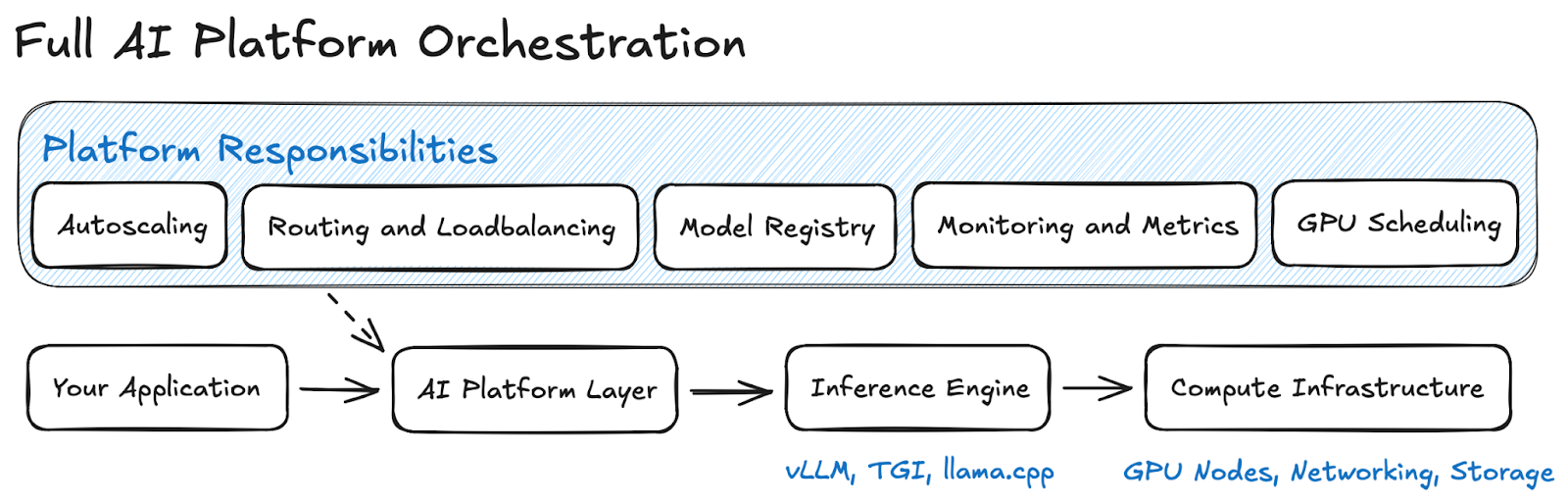 Full Orchestration
Open WebUI is a great starting point and here’s how you can get cracking right away!
7. Running LLMs inside an app?!
If you want full offline capability, or you’re building apps where shipping a server isn’t an option, running the model directly inside your application can be ✨. Instead of hosting an API, the model becomes part of the app binary or runtime.
This includes embedding LLMs inside:
-
Desktop apps
-
Mobile apps
-
Backend binaries
-
Browsers
This approach gives you fully offline inference with no infrastructure; the only downside is that you may need to run a smaller model unless you're running on specialised hardware.
A great way to run this would be by using runtimes like MLC-LLM, WebLLM, or even llama.cpp compiled directly into your app binary, all of which make it very practical to ship a small, fast model straight inside your application without relying on any external server.
Secure the inference endpoint before exposing it
A local model server is still a network service. Once it is reachable outside your machine, unauthenticated users may be able to consume GPU time, submit sensitive data, exhaust memory with oversized contexts, or access capabilities you intended to keep private.
Before exposing an endpoint:
-
Keep it bound to localhost or a private network unless public access is required.
-
Put TLS and authentication in front of it. Do not treat a placeholder API key accepted by a client library as access control.
-
Set request-size, context-length, concurrency, timeout, and rate limits so one request cannot monopolize the server.
-
Decide whether prompts and responses should be logged. Redact secrets and personal data, and set a retention period.
-
Restrict any tools, file access, or outbound network access available to the model runtime.
-
Monitor utilization, errors, queue depth, and latency, then keep the runtime, container image, drivers, and host patched.
If you need public access, place the inference server behind a gateway or reverse proxy rather than exposing Ollama, llama.cpp, vLLM, or SGLang directly.
Which option is the best for your needs?
Choosing a self-hosting strategy is a lot like choosing where to live: sometimes a massive condo is perfect, and sometimes you just want to be left alone with a shed, and maybe a GPU. Here are some situations that may influence your pick:
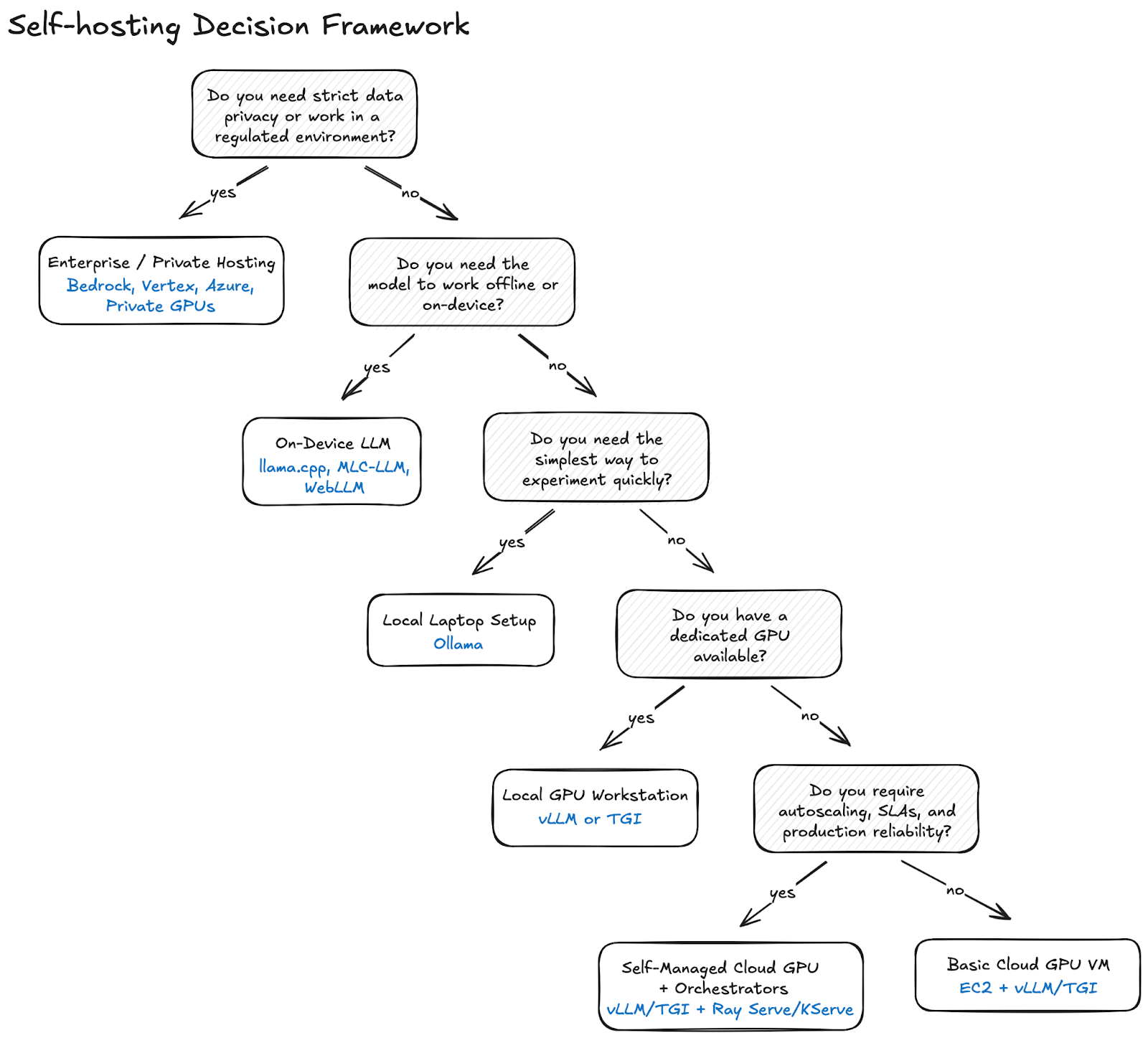 Decision Framework
Ready to get your model out in the wild?
Self-hosting an LLM isn't a single path. A private assistant on a laptop and a multi-tenant GPU cluster have very different memory, latency, security, and operational requirements. Start with the smallest setup that meets the workload, measure it under realistic context and concurrency, and scale only when the results justify it.