Hello world: Vibecoding my blog
How I replaced Hashnode with a personal Next.js and MDX blog, from design and typography to topic filtering, code blocks, and AI-assisted development.
I spent my weekend vibe coding my new blog site, and this is the story behind the interface I'd been imagining for far longer than I'd like to admit.
Why I left Hashnode
I was genuinely happy with Hashnode... until I wasn't.
The newer updates gradually started breaking many of the things that made me choose the platform in the first place.
-
I had 18 posts published, but only 15 were visible on the landing page. I went through my settings, publication details, and everything else I could think of, yet there was never a clear explanation for why three specific posts simply refused to appear.
-
Then came the redesign. I first noticed UX issues back in January and even pointed them out to the founders on X (formerly Twitter). To their credit, they acknowledged the feedback and fixed some of it quickly. But the broader direction still fell flat for me.
-
The new magazine-style layout disrupted the post hierarchy, reduced scanability, removed subtitles from the homepage (which I had spent time curating for context), and introduced a weird widget placement after the first few posts. Overall, it became a less enjoyable reading experience.
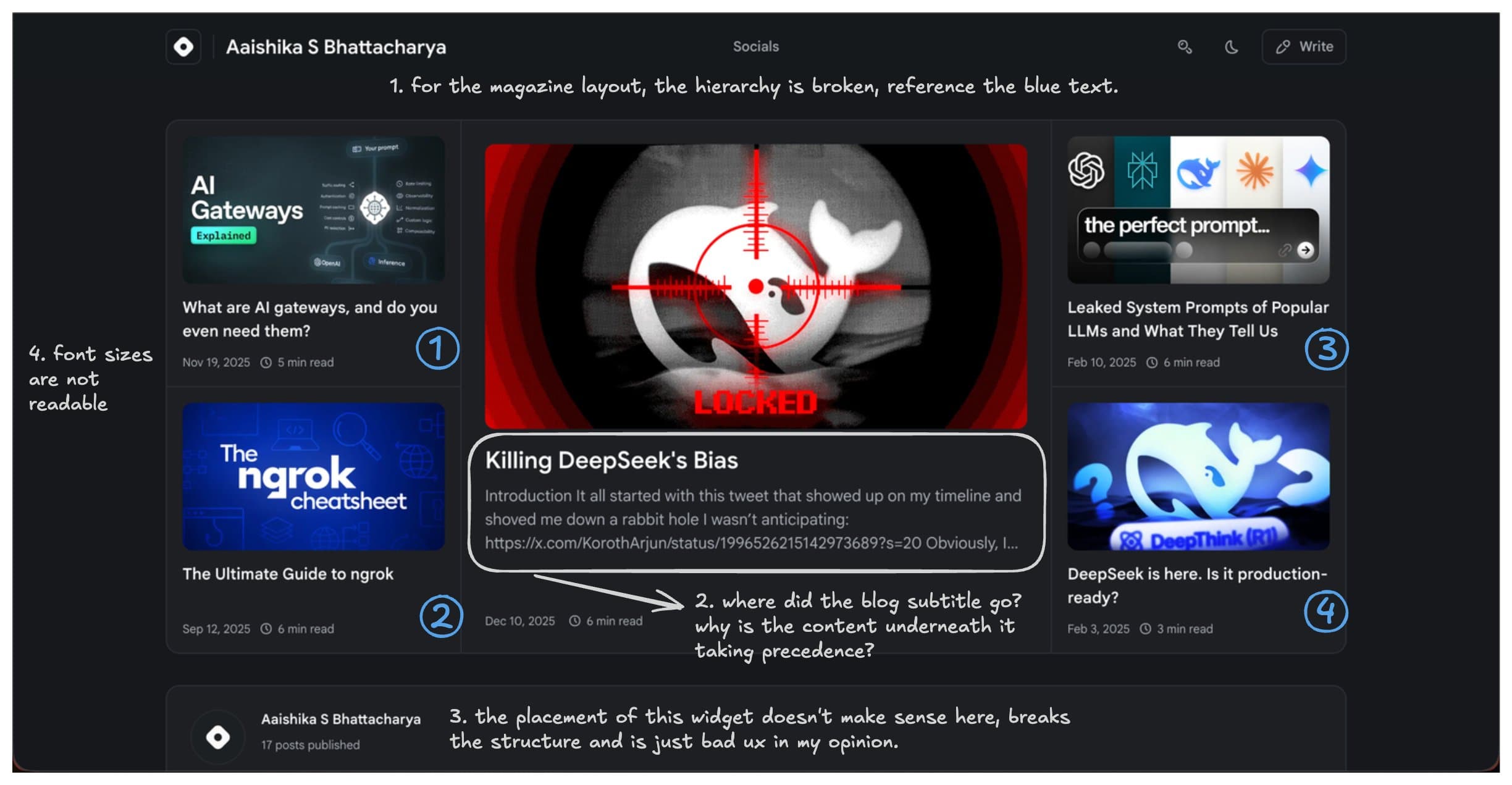 Concerns with Hashnode's New Layout
- The final nail in the coffin was performance. From logging in to opening the dashboard to starting a new draft, everything felt sluggish. Slow renders, hiccups, friction everywhere lately.
At some point, I realized there's only so much feedback you can give before it's easier to just build the thing yourself, and so I did.
I decided to build my own blog platform so I could control every detail, especially the reader experience. After writing about self-hosting for so long, owning my publishing stack felt like the natural next step, even if Vercel still handles the deployment infrastructure.
Finalizing the Design Intent
I wanted the landing page to feel minimal, clean, and informative. I'd previously received great feedback on my Shortlinks site (RIP Bento 💐), so I borrowed heavily from that design language, reusing parts of the header and structural patterns to maintain visual continuity across both sites.
Some of my biggest inspirations were:
-
Select UX touches from Hashnode and Medium: Metadata placement, post headers, and marker styling.
Typography
Some font options on the table were JetBrains Mono and Instrument Serif, but this is not a startup landing, so I chose Mona Sans and Hubot Sans from GitHub because they strike a nice balance between technical sharpness and readability (no digs). They feel modern without being sterile. For inline and code blocks, I retained Geist Mono.
| Class | Font Family | Description |
|---|---|---|
font-hubot | Hubot Sans | The default font for headings from H2-H4. |
font-mona | Mona Sans | Used in longform writing in Paragraphs and H1 headings. Also applied by default. |
font-mono | Geist Mono | Used to render code and tokens. |
The type scale or sizing starts at text-5xl for the blog title at H1, and then is a consistent spiral from text-3xl to text-lg from Tailwind, going through the headings (from H2 to H4) to the paragraphs.
Colors
Even though my initial preference was amber (an ode to my setup), I leaned heavily into Tailwind's rose variants for accent colors. They add warmth and personality without becoming visually loud. I am also a fan of some other variants like emerald, sky, and purple, and those are the ones I use in different components like the code snippets.
For example:
// Function to generate a random integer between min and max (inclusive)

function getRandomInt(min, max) {
  min = Math.ceil(min);
  max = Math.floor(max);
  return Math.floor(Math.random() * (max - min + 1)) + min;
}

// Example usage:

console.log(getRandomInt(1, 100)); // Outputs a number between 1 and 100
Mobile first
A huge priority for me was making sure the site feels good mobile first, then scales upward gracefully. Too many personal blogs still treat mobile as an afterthought, and again, this is not a startup's landing.
The most time-consuming features
One feature I'd always wanted was topic filtering. I wanted readers to quickly shuffle through different topics depending on what they cared about, like AI, Open source, community, prompt engineering, or my chaotic and opinionated thoughts. Getting the placement, logic, and interaction model right took more time than almost anything else.
The second biggest time sink was code blocks. Syntax highlighting, spacing, and especially theme parity between light mode and dark mode on those turned out to be quite an experiment.
Tools that helped
-
Far too many browser tabs
-
Mild suffering
The Build
How MDX files become routes
Every article lives in the posts directory as a date-prefixed MDX file. The filename encodes its publication date and public slug:
2026-04-19-hello-world.mdx → /hello-world
At build time, the post loader validates the filename and frontmatter, removes the date prefix to create the slug, and gives Next.js the list of visible posts through generateStaticParams. The shared /[slug] page then loads the matching file and renders its Markdown and embedded components with MDXRemote. Publishing stays close to the workflow I already use: add one MDX file, include its assets, and let the build create the route.
How frontmatter powers metadata
The YAML block at the top of each file acts as the control panel for the post. The visible title and excerpt feed the article and homepage, while optional seoTitle and seoDescription fields can be more search-focused without changing the on-page copy. Together with the route data, that frontmatter supplies the canonical URL, Open Graph and X cards, publication dates, cover image, and BlogPosting structured data.
The build also checks required fields, confirms that the filename date matches the frontmatter date, and verifies that local cover images exist. I wanted bad metadata to fail loudly during deployment instead of quietly turning into a broken search result or social preview.
Pair Programming Tool of Choice
I relied heavily on Cline to build this one. Of all the pair coding tools I've used, it gives me the most flexibility and the best context handling. I'm also very used to its checkpoint workflow, which becomes invaluable when you inevitably break something like three prompts deep.
My model of choice was Claude Sonnet 4.5, since I've consistently found Claude stronger than GPT for handling complex (and occasionally unstructured) demands. Cline does a solid job pulling relevant files into context, and with larger token windows available thanks to Claude, it made iterating significantly smoother.
What I appreciate most though is that I still feel like an active part of the process because I'm not asking AI to build everything for me; I'm also ideating and writing code alongside it.
The Stack
Next.js was a no-brainer. It handled routing cleanly and gave me a lot of flexibility to build and play around with random components.
I chose MDX because I already write in Markdown, and I didn't want to manually style every article from scratch. It also gives me room to add richer interactive components later; callouts, embeds, diagrams, and whatever future me gets obsessed with, sigh.
The Iterations
Even with a design system in place, I knew there were gaps because I am clearly not a designer. So throughout the process, I kept taking screenshots of the site at different stages and feeding them into ChatGPT for feedback. That helped fix several readability issues, spacing inconsistencies, and copywriting.
I also had an actual product designer, genuinely elite at her craft, review it and give it some finishing touches, which may explain the last 20 commits.
After a lot of tweaks here and there, I finally landed on something I wanted to showcase to the world, and you're reading this post on it. ❤️
Why this exists
This blog exists because curating content brings me a lot of joy, and I wanted a better space on the internet to showcase that. Spending a weekend working on this was highly rewarding, and I look forward to consistently sharing more posts around random experiments, opinions, and the joy of building in public!
Let's see where this goes.